What is SoundCloud Downloader?
SoundCloudDownload.com lets you download any SoundCloud track, playlist, or album as a high-quality MP3 file — completely free. No app installs, no browser extensions, no SoundCloud account needed. Just paste a SoundCloud link and your download is ready in seconds with full metadata.
Works for both standard SoundCloud tracks and SoundCloud Go+ exclusive content. Save songs from your favorite artists directly to your phone or computer — listen offline anywhere, in any music player, on any device.
How to Download SoundCloud Songs to MP3
Step 1: Open SoundCloud in your web browser at soundcloud.com or in the SoundCloud mobile app.
Step 2: Navigate to the song, album, or playlist page you want to download.
Step 3: Click the "Share" button under the track, then select "Copy Link".
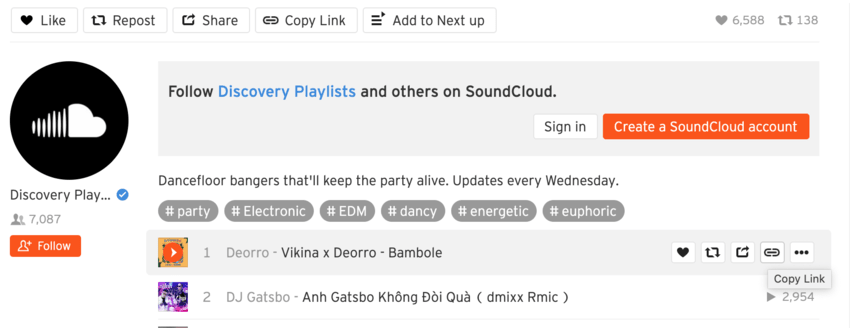
Step 4: Paste the SoundCloud link in the search box above and click "Start".
Step 5: Click "Get Download", then "Download MP3" to save the file to your device with cover art.
Why Use SoundCloudDownload.com?
High-Quality MP3 Audio
Every download preserves the original sound quality of the SoundCloud track for the best offline listening experience — up to 320kbps MP3.
Fast Conversions in Seconds
Most SoundCloud songs are converted and ready to download in under 10 seconds — no long waits, no queues.
100% Free with No Limits
Download unlimited songs, playlists, and albums. No daily caps, hidden fees, premium plans, or signup required.
Works on Any Device
Runs in your browser on iPhone, Android, Mac, Windows, Linux, tablets. No app or extension needed.
Cover Art & Metadata
Each MP3 includes track title, artist name, and SoundCloud artwork — your music library stays clean and organized.
Private & Secure
We use HTTPS encryption end-to-end and never store your downloads or personal data on our servers.
Frequently Asked Questions
1. How do I download SoundCloud songs to MP3?
Copy the SoundCloud song link (using the Share button), paste it into the search box, and click Start. Your MP3 will be ready in seconds.
2. Is SoundCloudDownload really free?
Yes, completely free with no hidden charges, subscription, or premium tier. Download unlimited SoundCloud tracks at no cost.
3. Is there a download limit?
No. Download as many SoundCloud tracks as you like with no per-day, per-IP, or other restrictions.
4. Do I need to install any software?
No. Everything works directly in your web browser — no software, Chrome extensions, or Android APKs required.
5. Can I download full playlists and albums?
Yes. Paste a SoundCloud playlist or album URL and download every track individually as a separate MP3 file.
6. What devices are supported?
Any device with a web browser — iPhone, Android phone, iPad, Windows PC, Mac, Linux, tablets. Files save to your device's downloads folder.
7. Is SoundCloudDownload safe?
Yes. All connections use HTTPS encryption. We never collect personal data, never require signup, and don't store your downloads on our servers.
8. Can I keep the downloaded songs forever?
Yes. Downloaded MP3 files are saved to your device and available for offline listening indefinitely. They are yours to keep, transfer, or back up.
9. Does it work with private SoundCloud tracks?
Our tool works with public SoundCloud links. Private or unlisted tracks require the original sharer to make the URL accessible first.
10. What audio quality do I get?
Downloads are extracted at the highest quality SoundCloud offers for each track — typically 128kbps MP3 for standard tracks, up to 256kbps for Go+ content.